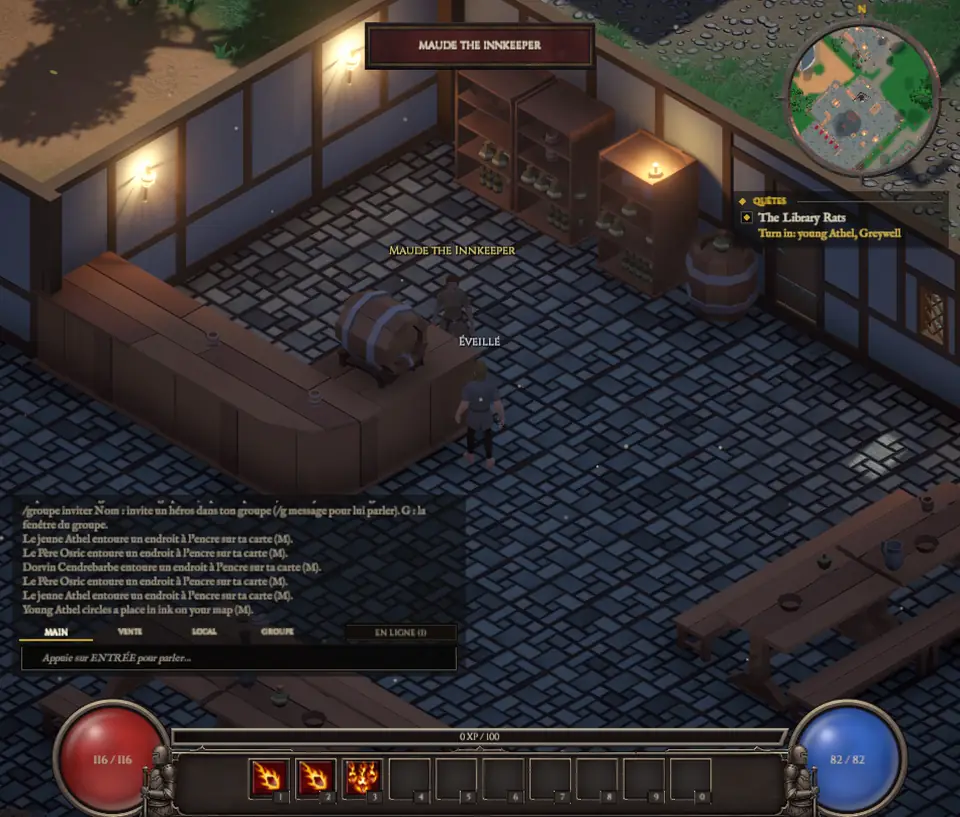
- The red orb
- Your health. It comes back on its own, little by little.
- The blue orb
- Your mana, for spells.
- The experience bar
- Above the bottom bar: when it is full, you gain a level.
- The bottom bar
- Ten slots, keys 1 to 0: potions, spells, the Temple Stone. Drag an item from your bag or a spell from your book onto it.
- The chat
- Bottom left, with its MAIN, TRADE, LOCAL and PARTY tabs. You can move and resize it when you hover over it.
- The minimap
- Top right, north at the top.
- The quest tracker
- Under the minimap: your current quests and how far along you are. Untick a quest to remove its circle from the map.
- The target frame
- It appears when you aim at a creature: its name, its health, and small pieces that tell what it fears and what it resists.
The windows
The character sheet (C), the spell book (L), the quest journal (J) and the party (G) open in one tabbed window. Esc closes the window on top.